


AI came in through the side door
Your help desk started drafting replies. Your CRM began scoring leads. Your meeting tool now transcribes and summarises every call. Your applicant tracking system quietly ranks CVs. None of these needed a procurement decision and many were switched on by default.
The processing activities in your RoPA haven’t changed their names. But the processing behind them has. New purposes, new sub-processors, new transfers and in some cases decisions about people that a model now shapes. A record written two years ago won’t say so.
And the GDPR hasn’t moved. DPIAs for high-risk processing, safeguards for solely automated decisions, processor terms and transparency all apply today, in the EU and the UK.
Four questions for every processing activity
Start with the systems each activity uses, not with a list of “AI projects”. AI rarely shows up as a project.
- Does any linked system have AI in it? Switched on or not. Check release notes and vendor trust pages, not just contracts.
- What kind of AI is it? Assistive, generative, predictive or core. Each carries a different risk and a different set of duties.
- Does it shape decisions about people? Hiring, credit and monitoring are where Annex III and automated-decision rules bite.
- Where does the data go? A model provider is a new recipient, often a new sub-processor and sometimes a new transfer.
What it looks like when AI is a field, not a footnote
Here’s a sample estate for Harbourline Retail, a fictional 640-person retailer, in the PrivacyCulture RoPA Estate View. Every system and vendor carries an AI capability. Filter on it and the estate collapses to the activities that matter. Switch to Review status, and you can see which of them nobody has looked at since the AI arrived.
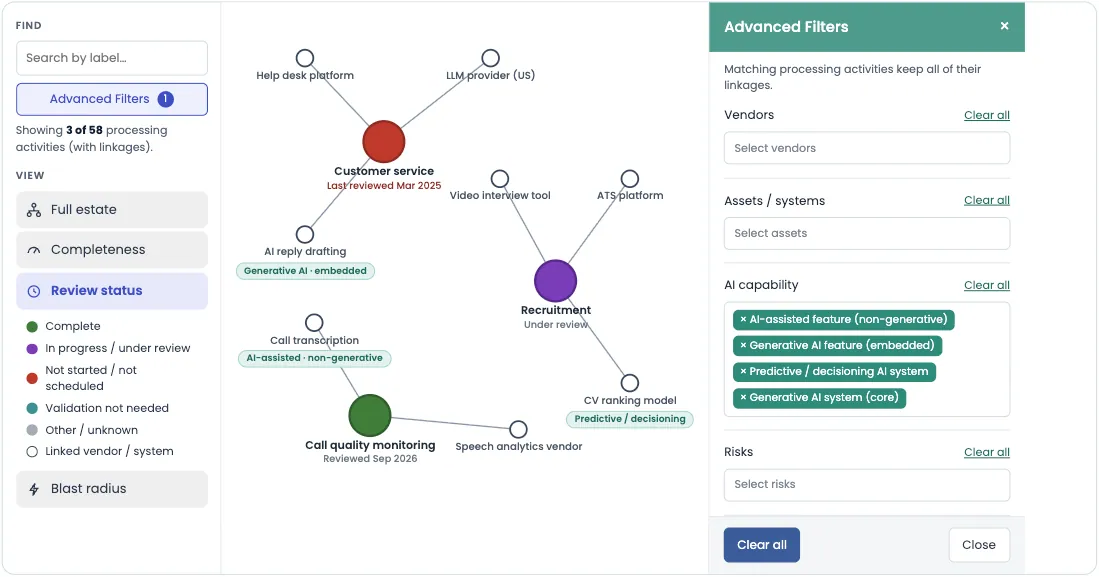
Sample data for a fictional company. Filtering by AI capability in Review status view shows which AI-linked activities have been reviewed since the AI arrived, and which haven’t.
Three activities out of 58, coloured by review status. Call quality monitoring was reviewed after its vendor added transcription. Recruitment is under review and it should be. A predictive model ranking CVs is recruitment AI, the kind Annex III covers from December 2027 and a question about automated decision making.
Customer service is the one that slipped through. Its help desk added generative reply drafting, which sends data to a US model provider and the record hasn’t been reviewed since March 2025. That’s what vendors quietly adding AI looks like in practice. The activity looks fine but its last review predates the AI.
An AI inventory and a RoPA aren’t two projects. They’re the same map, with one extra field.
Make it stick
- Tag AI capability on every system and vendor. Use a short, fixed list (assistive, generative embedded, predictive or decisioning, generative core) so the tags stay comparable.
- Re-check at renewal and on release notes. When a vendor announces an AI feature, that’s your trigger to update the record, not next year’s review.
- Link changes to your DPIA process. If an activity’s AI capability changes, review whether its DPIA, privacy notice and processor terms still hold.